Using the Customer Software

This tab allows connection to the camera and setting of the COM port to use on the PC.
Once connected there is quick access to the time and date setting as well as image downloading screens.
The other functions are obtained via the advanced button and described here.
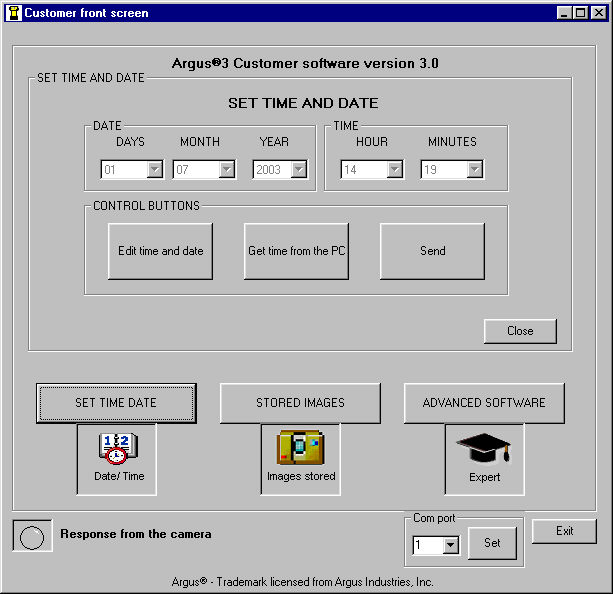
This tab enables the user to adjust the time on the camera.
The 'Get Time from PC' button loads the screen with the time set on the PC, while the 'Edit Time and Date' button allows the time to be set manually.
Once the time and date are correct press the 'Send' button to send it to the camera.
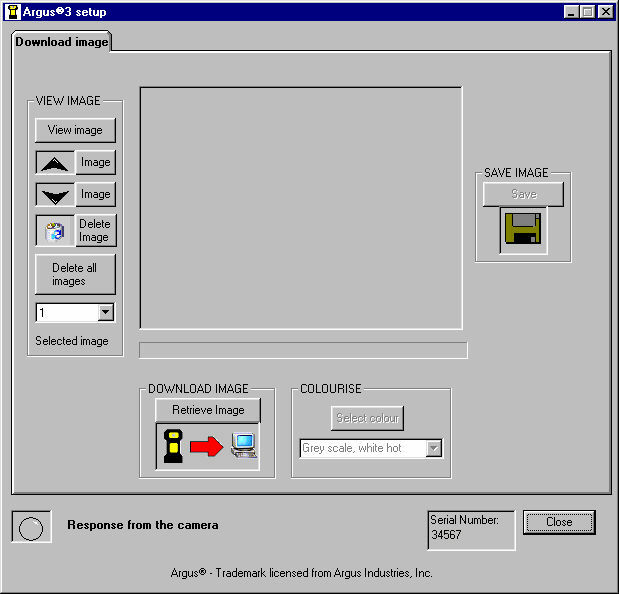
This screen allows the user to look through and delete images on the camera using the buttons under 'VIEW IMAGE'.
When the desired image is on the camera it can be retrieved using the 'Retrieve Image' button and then appears in the display area of this tab.
When an image has been retrieved into the display area it has additional information (time, date etc) added automatically.
Once loaded into the screen an image can have its' colouring changed by selecting a new colouring under 'COLOURISE'.
The image is then saved using the 'Save' button.
 Return to Index
ARGUS® 3 CD ROM © e2v technologies
Argus® - Trademark licensed from Argus Industries, Inc.